Introduction
Welcome
This documentation provides comprehensive guidance for deploying FortiGate autoscale groups in AWS using the FortiGate Autoscale Simplified Template. This template serves as an accessible wrapper around Fortinet’s enterprise-grade FortiGate Autoscale Templates, dramatically reducing deployment complexity while maintaining full architectural flexibility.
Purpose and Scope
The official FortiGate autoscale templates available in the terraform-aws-cloud-modules repository deliver powerful capabilities for deploying elastic, scalable security architectures in AWS. However, these templates require:
- Deep familiarity with complex Terraform variable structures
- Strict adherence to specific syntax requirements
- Extensive knowledge of AWS networking and FortiGate architectures
- Significant time investment to understand configuration dependencies
The Simplified Template addresses these challenges by:
- Abstracting complexity: Encapsulates intricate configuration patterns into intuitive boolean variables and straightforward parameters
- Accelerating deployment: Reduces configuration time from hours to minutes through common-use-case defaults
- Maintaining flexibility: Retains access to advanced features while providing sensible defaults for standard deployments
- Reducing errors: Minimizes misconfiguration risks through validated input patterns and clear parameter descriptions
What This Template Provides
The Simplified Template enables rapid deployment of FortiGate autoscale groups by simplifying configuration of:
Core Infrastructure
- Network architecture: VPC creation or integration with existing network resources
- Subnet design: Automated subnet allocation across multiple Availability Zones
- Transit Gateway integration: Optional connectivity to existing Transit Gateway hubs
- Load balancing: AWS Gateway Load Balancer (GWLB) configuration and target group management
Autoscale Configuration
- Capacity management: Minimum, maximum, and desired instance counts
- Scaling policies: CPU-based thresholds and CloudWatch alarm configuration
- Instance specifications: FortiGate version, instance type, and AMI selection
- High availability: Multi-AZ distribution and health check parameters
Licensing and Management
- Licensing flexibility: Support for BYOL, PAYG, and FortiFlex licensing models
- License automation: Automated license file distribution or token generation
- Hybrid licensing: Configuration for combining multiple license types
- FortiManager integration: Optional centralized management and policy orchestration
Security and Access
- Management access: Dedicated management interfaces or combined data/management design
- Key pair configuration: SSH access for administrative operations
- Security groups: Automated creation of appropriate ingress/egress rules
- IAM roles: Lambda function permissions for license and lifecycle management
Egress Strategies
- Elastic IP allocation: Per-instance EIP assignment for consistent source NAT
- NAT Gateway integration: Shared NAT Gateway configuration for cost optimization
- Route management: Automated routing table updates for egress traffic flows
Common Use Cases
This template is specifically designed for the most frequently deployed FortiGate autoscale architectures:
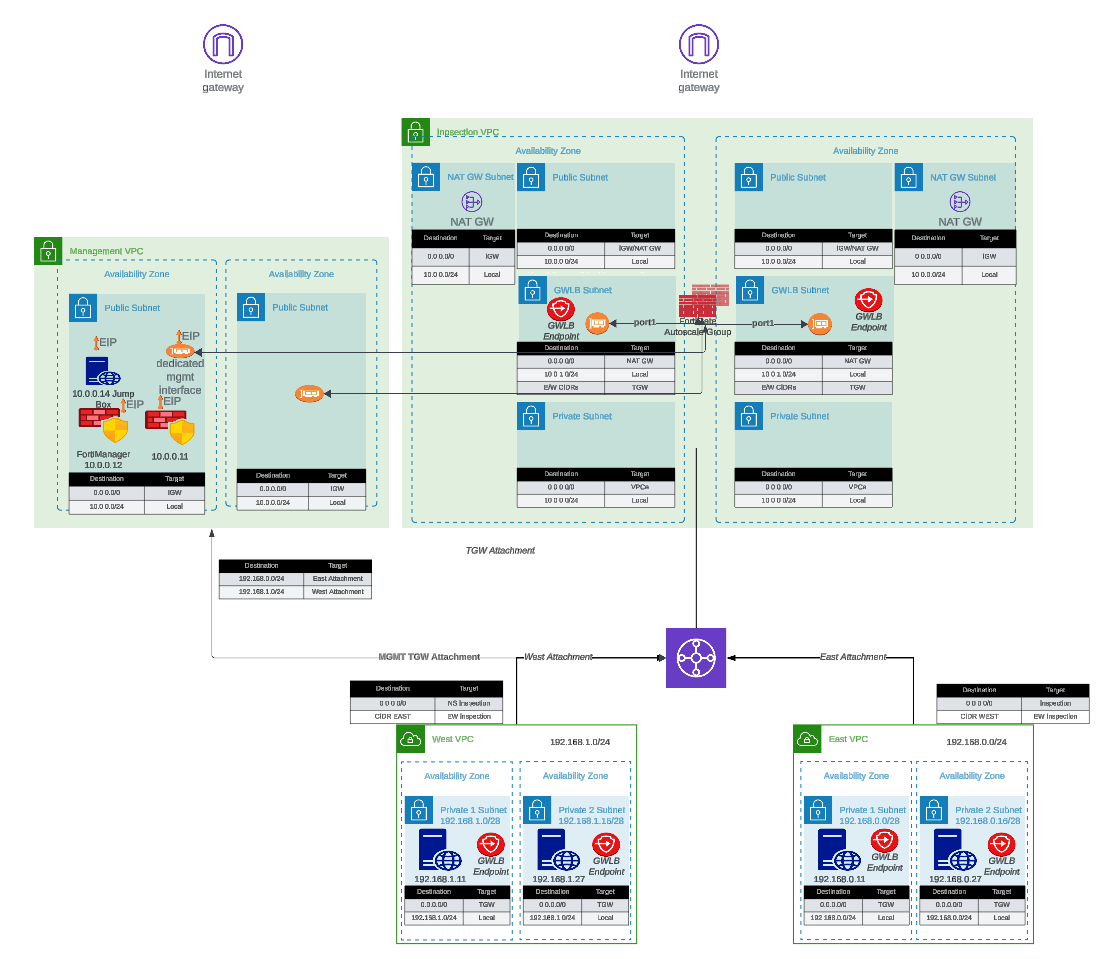
- Centralized Inspection with Transit Gateway: Single inspection VPC serving multiple spoke VPCs through Transit Gateway routing
- Dedicated Management VPC: Isolated management plane for FortiManager/FortiAnalyzer integration with production traffic inspection VPC
- Hybrid Licensing Architectures: Cost-optimized deployments combining BYOL/FortiFlex baseline capacity with PAYG burst capacity
- Existing Infrastructure Integration: Deployment into pre-existing VPCs, subnets, and Transit Gateway environments
How It Works
The Simplified Template approach:
- Variable Abstraction: Translates complex nested map structures into simple boolean flags and direct parameters
- Conditional Logic: Automatically enables or disables features based on use-case selection
- Default Values: Provides production-ready defaults for parameters not requiring customization
- Validation: Implements input validation to catch configuration errors before deployment
- Module Invocation: Dynamically constructs proper syntax for underlying enterprise templates
- Output Standardization: Presents consistent outputs regardless of architecture variation
Prerequisites
Before using this template, ensure you have:
Required Knowledge
- Basic understanding of AWS networking concepts (VPCs, subnets, route tables)
- Familiarity with Terraform workflow (
init,plan,apply,destroy) - General understanding of FortiGate firewall concepts
- AWS account with appropriate permissions for VPC, EC2, Lambda, and IAM resource creation
Required Tools
- Terraform: Version 1.0 or later (Download)
- AWS CLI: Configured with appropriate credentials (Installation Guide)
- Git: For cloning the repository
- Text Editor: For editing
terraform.tfvarsconfiguration files
AWS Resources
- AWS Account: With permissions to create VPCs, subnets, EC2 instances, Lambda functions, and IAM roles
- Service Quotas: Sufficient EC2 instance limits for desired autoscale group size
- S3 Bucket (for BYOL): Storage location for FortiGate license files
- Key Pair: Existing EC2 key pair for SSH access to FortiGate instances
Optional Resources
- FortiManager: For centralized management (if integration is desired)
- FortiAnalyzer: For centralized logging and reporting
- Transit Gateway: If integrating with existing hub-and-spoke architecture
- FortiFlex Account: If using FortiFlex licensing model
Documentation Structure
This guide is organized into the following sections:
- Introduction (this section): Overview, purpose, and prerequisites
- Overview: Architecture patterns, key benefits, and solution capabilities
- Licensing: Detailed comparison of BYOL, PAYG, and FortiFlex licensing options
- Solution Components: In-depth explanation of architectural elements and configuration options
- Templates: Step-by-step deployment procedures and configuration examples
Additional Resources
For comprehensive FortiGate and FortiOS documentation beyond the scope of this deployment guide, please reference:
- FortiGate Documentation Portal: docs.fortinet.com
- FortiGate AWS Deployment Guides: docs.fortinet.com/document/fortigate-public-cloud/
- AWS Marketplace FortiGate Listings: AWS Marketplace
- Fortinet Developer Network (FNDN): fndn.fortinet.net (requires registration)
- FortiGate Administration Guide: docs.fortinet.com/fortigate/admin-guide
- Terraform AWS Cloud Modules Repository: GitHub - fortinetdev/terraform-aws-cloud-modules
Support and Feedback
For technical support:
- Enterprise Template Issues: Report issues on the terraform-aws-cloud-modules GitHub repository
- FortiGate Technical Support: Open support tickets at FortiCare Support Portal
- AWS Infrastructure Issues: Contact AWS Support through your AWS account
For documentation feedback or Simplified Template enhancement requests, please reach out through your Fortinet account team or technical contacts.
Getting Started
Ready to deploy? Proceed to the Overview section to understand the architecture patterns available, or jump directly to the Templates section to begin configuration and deployment.