Internet Egress Options
Overview
The FortiGate autoscale solution provides two distinct architectures for internet egress traffic, each optimized for different operational requirements and cost considerations.
Option 1: Elastic IP (EIP) per Instance
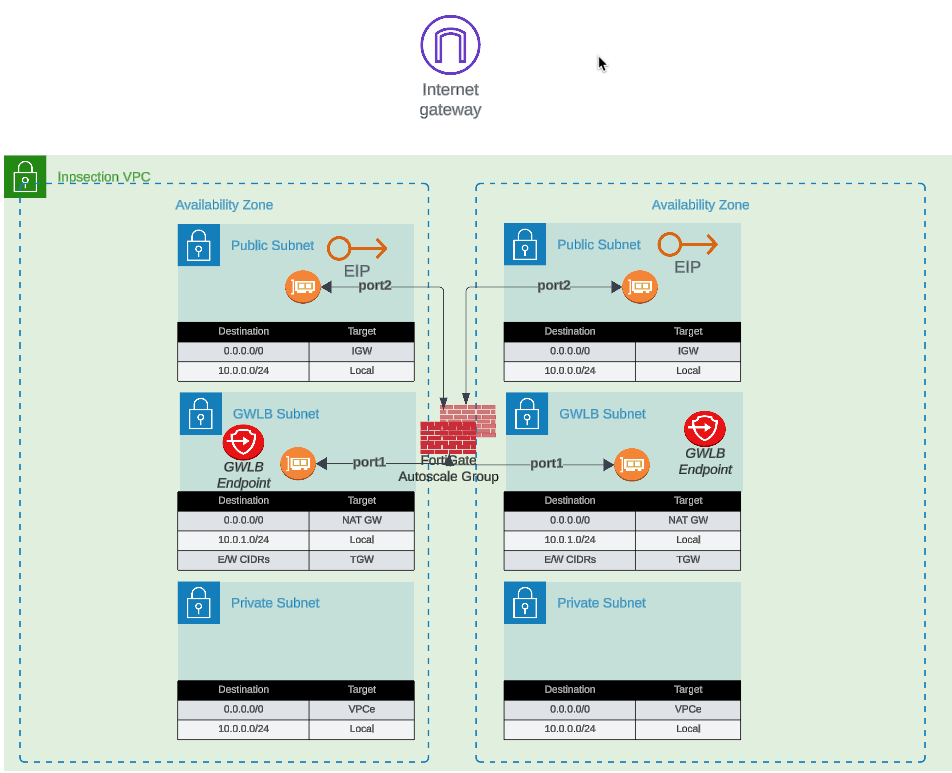
Each FortiGate instance in the autoscale group receives a dedicated Elastic IP address. All traffic destined for the public internet is source-NATed behind the instance’s assigned EIP.
Configuration
access_internet_mode = "eip"Architecture Behavior
In EIP mode, the architecture routes all internet-bound traffic to port2 (the public interface). The route table for the public subnet directs traffic to the Internet Gateway (IGW), where automatic source NAT to the associated EIP occurs.
Advantages
- No NAT Gateway costs: Eliminates monthly NAT Gateway charges ($0.045/hour + data processing)
- Distributed egress: Each instance has independent internet connectivity
- Simplified troubleshooting: Per-instance source IP simplifies traffic flow analysis
- No single point of failure: Loss of one instance’s EIP doesn’t affect others
Considerations
- Unpredictable IP addresses: EIPs are allocated from AWS’s pool; you cannot predict or specify the assigned addresses
- Allowlist complexity: Destinations requiring IP allowlisting must accommodate a pool of EIPs (one per maximum autoscale capacity)
- IP churn during scaling: Scale-out events introduce new source IPs; scale-in events remove them
- Limited EIP quota: AWS accounts have default limits (5 EIPs per region, increased upon request)
Best Use Cases
- Cost-sensitive deployments where NAT Gateway charges exceed EIP allocation costs
- Environments where destination allowlisting is not required
- Architectures prioritizing distributed egress over consistent source IPs
- Development and testing environments with limited budget
Option 2: NAT Gateway
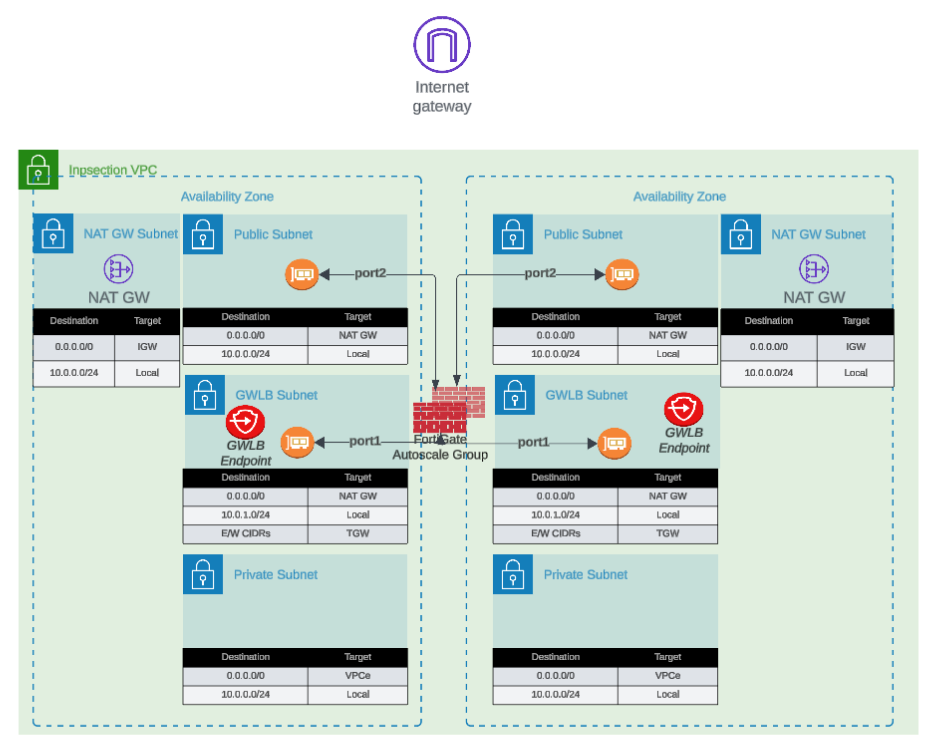
All FortiGate instances share one or more NAT Gateways deployed in public subnets. Traffic is source-NATed to the NAT Gateway’s static Elastic IP address.
Configuration
access_internet_mode = "nat_gw"Architecture Behavior
NAT Gateway mode requires additional subnet and route table configuration. Internet-bound traffic is first routed to the NAT Gateway in the public subnet, which performs source NAT to its static EIP before forwarding to the IGW.
Advantages
- Predictable source IP: Single, stable public IP address for the lifetime of the NAT Gateway
- Simplified allowlisting: Destinations only need to allowlist one IP address (per Availability Zone)
- High throughput: NAT Gateway supports up to 45 Gbps per AZ
- Managed service: AWS handles NAT Gateway scaling and availability
- Independent of FortiGate scaling: Source IP remains constant during scale-in/scale-out events
Considerations
- Additional costs: $0.045/hour per NAT Gateway + $0.045 per GB data processed
- Per-AZ deployment: Multi-AZ architectures require NAT Gateway in each AZ for fault tolerance
- Additional subnet requirements: Requires dedicated NAT Gateway subnet in each AZ
- Route table complexity: Additional route tables needed for NAT Gateway routing
Cost Analysis Example
Scenario: 4 FortiGate instances processing 10 TB/month egress traffic
EIP Mode:
- 4 EIP allocations: $0 (first EIP free, then $0.00/hour per EIP)
- Total monthly: ~$0 (minimal costs)
NAT Gateway Mode (2 AZs):
- 2 NAT Gateways: 2 × $0.045/hour × 730 hours = $65.70
- Data processing: 10,000 GB × $0.045 = $450.00
- Total monthly: $515.70
Decision Point: NAT Gateway makes sense when consistent source IP requirement justifies the additional cost.
Best Use Cases
- Production environments requiring predictable source IPs
- Compliance scenarios where destination IP allowlisting is mandatory
- High-volume egress traffic to SaaS providers with IP allowlisting requirements
- Architectures where operational simplicity outweighs additional cost
Decision Matrix
| Factor | EIP Mode | NAT Gateway Mode |
|---|---|---|
| Monthly Cost | Minimal | $500+ (varies with traffic) |
| Source IP Predictability | Variable (changes with scaling) | Stable |
| Allowlisting Complexity | High (multiple IPs) | Low (single IP per AZ) |
| Throughput | Per-instance limit | Up to 45 Gbps per AZ |
| Operational Complexity | Low | Medium |
| Best For | Dev/test, cost-sensitive | Production, compliance-driven |
Next Steps
After selecting your internet egress option, proceed to Firewall Architecture to configure the FortiGate interface model.