Autoscale Group Capacity
Overview
Configure the autoscale group size parameters to define minimum, maximum, and desired instance counts for both BYOL and on-demand (PAYG) autoscale groups.
Configuration
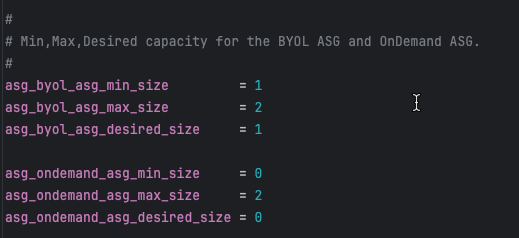
# BYOL ASG capacity
asg_byol_asg_min_size         = 1
asg_byol_asg_max_size         = 2
asg_byol_asg_desired_size     = 1

# On-Demand (PAYG) ASG capacity
asg_ondemand_asg_min_size     = 0
asg_ondemand_asg_max_size     = 2
asg_ondemand_asg_desired_size = 0
Parameter Definitions
| Parameter | Description | Recommendations |
|---|---|---|
min_size | Minimum number of instances ASG maintains | Set to baseline capacity requirement |
max_size | Maximum number of instances ASG can scale to | Set based on peak traffic projections + 20% buffer |
desired_size | Target number of instances ASG attempts to maintain | Typically equals min_size for baseline capacity |
Capacity Planning Strategies
Strategy 1: BYOL Baseline with PAYG Burst (Recommended)
Objective: Optimize costs by using BYOL for steady-state traffic and PAYG for unpredictable spikes
# BYOL handles baseline 24/7 traffic
asg_byol_asg_min_size = 2
asg_byol_asg_max_size = 4
asg_byol_asg_desired_size = 2

# PAYG handles burst traffic only
asg_ondemand_asg_min_size = 0
asg_ondemand_asg_max_size = 6
asg_ondemand_asg_desired_size = 0
Scaling behavior:
- Normal operations: 2 BYOL instances handle traffic
- Traffic increases: BYOL ASG scales up to 4 instances
- Traffic continues increasing: PAYG ASG scales from 0 → 6 instances
- Traffic decreases: PAYG ASG scales down to 0, then BYOL ASG scales down to 2
Strategy 2: All PAYG (Simplest)
Objective: Maximum flexibility with zero license management overhead
# No BYOL instances
asg_byol_asg_min_size = 0
asg_byol_asg_max_size = 0
asg_byol_asg_desired_size = 0

# All capacity is PAYG
asg_ondemand_asg_min_size = 2
asg_ondemand_asg_max_size = 8
asg_ondemand_asg_desired_size = 2
Use cases:
- Proof of concept or testing
- Short-term projects (< 6 months)
- Extreme variability where license planning is impractical
Strategy 3: All BYOL (Lowest Cost)
Objective: Minimum operating costs for long-term, predictable workloads
# All capacity is BYOL
asg_byol_asg_min_size = 2
asg_byol_asg_max_size = 6
asg_byol_asg_desired_size = 2

# No PAYG instances
asg_ondemand_asg_min_size = 0
asg_ondemand_asg_max_size = 0
asg_ondemand_asg_desired_size = 0Requirements:
- Sufficient BYOL licenses for
max_size(6 in this example) - Predictable traffic patterns that rarely exceed max capacity
- Willingness to accept capacity ceiling (no burst beyond BYOL max)
CloudWatch Alarm Integration
Autoscale group scaling is triggered by CloudWatch alarms monitoring CPU utilization:
Default thresholds (set in underlying module):
- Scale-out alarm: CPU > 70% for 2 consecutive periods (2 minutes)
- Scale-in alarm: CPU < 30% for 2 consecutive periods (2 minutes)
Customization (requires editing underlying module):
# Located in module: fortinetdev/cloud-modules/aws
scale_out_threshold = 80  # Higher threshold = more aggressive cost optimization
scale_in_threshold  = 20  # Lower threshold = more aggressive cost optimization
Capacity Planning Calculator
Formula: Capacity Needed = (Peak Gbps Throughput) / (Per-Instance Gbps) × 1.2
Example:
- Peak throughput requirement: 8 Gbps
- c6i.xlarge (4 vCPU) with IPS enabled: ~2 Gbps per instance
- Calculation: 8 / 2 × 1.2 = 4.8 → round up to 5 instances
- Set
max_size = 5or higher for safety margin
Important Considerations
Tip
Testing Capacity Settings
For initial deployments and testing:
- Start with min_size = 1 and max_size = 2 to verify traffic flows correctly
- Test scaling by generating load and monitoring ASG behavior
- Once validated, increase capacity to production values via AWS Console or Terraform update
- No need to destroy/recreate stack just to change capacity settings
Next Steps
After configuring capacity, proceed to Primary Scale-In Protection to protect the primary instance from being terminated during scale-in events.