Lab 3 — MCP Discovery
Lab 3 switches the agent from hardcoded tools to MCP-discovered tools — without changing a line of agent code. You will see dynamic discovery in action, add a new tool to a running system without restarting the agent, and observe that the agent loop behaves identically regardless of which backend is active.
Docker Compose — every command on this page runs on your own machine.
Before you start, confirm Lab 2’s stack is still up:
cd ~/ai-101/lab-app/compose
docker compose ps
Expect ollama, agent, and ui with state running. If they are not, redo the
Lab 2 deploy step.
On Kubernetes instead? Click the Kubernetes / Helm tab — every lab page will follow your choice.
Kubernetes / Helm — every command on this page runs in your Cloud Shell session against your cluster.
Before you start, confirm the cluster and your agent port-forward:
kubectl get pods -l app.kubernetes.io/instance=ai101
jobs
Expect the ai101-ollama, ai101-agent, and ai101-ui pods Running, and the
agent port-forward from Lab 2 listed by jobs. If it is missing, restart it:
kubectl port-forward svc/ai101-agent 8001:8001 > /tmp/ai101-agent-port-forward.log 2>&1 < /dev/null &Running locally with Docker instead? Click the Docker Compose tab — every lab page will follow your choice.
Deploy
cd ~/ai-101/lab-app/compose
docker compose --profile lab2 down 2>/dev/null; true
docker compose --profile lab3 up -d
Verify:
cd ~/ai-101/lab-app/compose
docker compose ps
curl -s http://localhost:8001/health | jq .
# Expected: "tool_mode": "mcp"
curl -s http://localhost:8001/tools | jq '.tools[].name'
# Expected: "query_employees", "send_message"
cd ~/ai-101/lab-app/helm
helm upgrade --install ai101 ./ai101 -f ai101/values-lab3.yaml
kubectl wait deployment/ai101-agent --for=condition=Available --timeout=120sStart the agent port-forward only if it is not already forwarded (check with jobs):
kubectl port-forward svc/ai101-agent 8001:8001 > /tmp/ai101-agent-port-forward.log 2>&1 < /dev/null &The UI is reachable directly via NodePort:
echo "UI: http://$(whoami)-worker.$(az group show -n $(whoami)-k8s101-workshop --query location -o tsv).cloudapp.azure.com:30280"Verify:
curl -s http://localhost:8001/health | jq .
# Expected: "tool_mode": "mcp"
curl -s http://localhost:8001/tools | jq '.tools[].name'
# Expected: "query_employees", "send_message"
Step 1 — Same agent, different backend
Open the UI, then ask the question below.
Open http://localhost:8080.
Open the FQDN link printed by the echo command in the Deploy step above
(NodePort 30280).
Who is in the Engineering department?
The response is identical to Lab 2. The Trace panel shows the same tool call. The only difference is how that call was dispatched: over HTTP to the MCP server rather than as a direct function call in the same process.
Check how the agent currently sees its tools:
curl -s http://localhost:8001/tools | jq '{mode: .mode, tools: [.tools[].name]}'{
"mode": "mcp",
"tools": [
"query_employees",
"send_message"
]
}Step 2 — Compare discovery vs hardcoded
Open lab-app/images/agent/main.py and compare the two loader functions:
def _load_hardcoded() -> None:
    global _schemas, _dispatch
    _schemas  = tool_module.TOOL_SCHEMAS    # static list from tools.py
    _dispatch = tool_module.TOOL_FUNCTIONS

async def _discover_mcp() -> None:
    global _schemas
    async with streamablehttp_client(MCP_BASE_URL) as (read, write, _):
        async with ClientSession(read, write) as session:
            await session.initialize()
            result = await session.list_tools()
    _schemas = [                            # same format, different source
        {"type": "function", "function": {
            "name": t.name, "description": t.description, "parameters": t.inputSchema
        }}
        for t in result.tools
    ]
Both functions produce the same _schemas format. Everything below them in
main.py — the _run_agent() loop, the LLM call, the trace — is unchanged.
Now find _run_tool() and see how the dispatch differs between modes. The loop
itself never calls this function differently.
Step 3 — Add a tool without restarting the agent
cd ~/ai-101/lab-app/compose
ENABLE_EXTRA_TOOL=true docker compose --profile lab3 up -d mcp-server
Expected: only the mcp-server container is recreated.
cd ~/ai-101/lab-app/helm
helm upgrade ai101 ./ai101 -f ai101/values-lab3.yaml \
    --set mcpServer.enableExtraTool=true
Expected output:
Release "ai101" has been upgraded. Happy Helming!
NAME: ai101
LAST DEPLOYED: Wed Jul 15 19:13:24 2026
NAMESPACE: default
STATUS: deployed
REVISION: 8
DESCRIPTION: Upgrade complete
TEST SUITE: None- Only the MCP server was restarted. The agent container is still running with its previous tool list. Trigger re-discovery without touching the agent:
curl -s -X POST http://localhost:8001/tools/refresh | jq .{
"refreshed": true,
"count": 3
}- Check updated tools now
curl -s http://localhost:8001/tools | jq '.tools[].name'"query_employees"
"send_message"
"search_web"The agent now knows about search_web. The model can call it on the next
request. No rebuild. No code change.
Step 4 — Use the new tool
In the chat box:
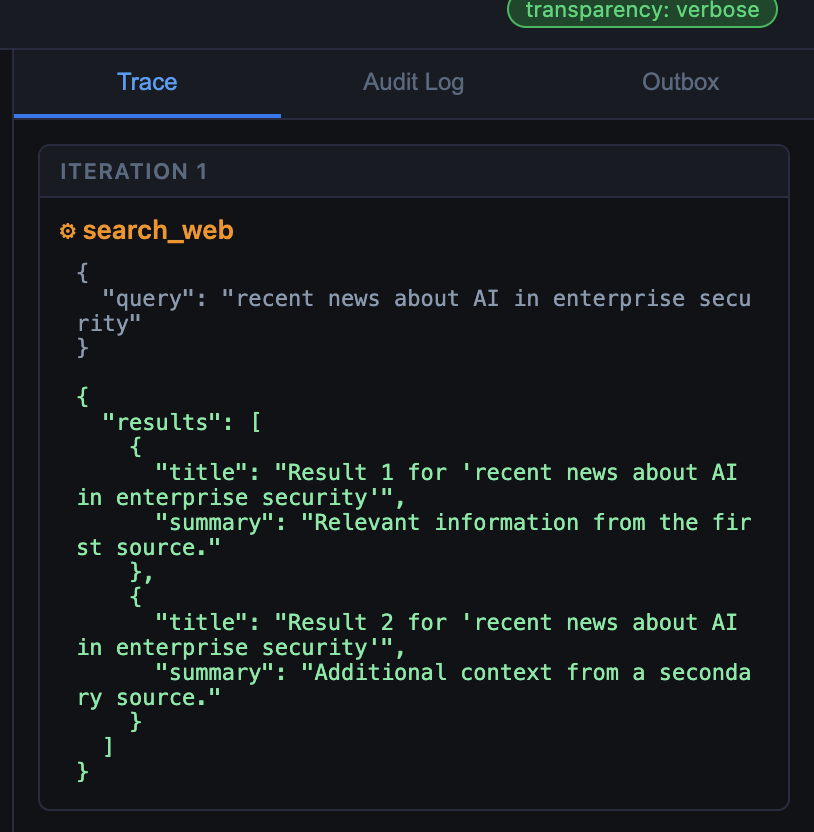
Search the web for recent news about AI in enterprise security.
The Trace panel should show search_web being called. The result is stubbed
(the server returns canned text), but the full discovery → schema registration
→ tool call → result flow is real.
What just happened
The agent discovered and used a tool it had no knowledge of at startup, without a code change or restart. This is exactly what makes MCP compelling for production environments: tool capability expands without touching the agent.
It is also what makes it a new attack surface. The model reads tool descriptions the same way it reads any other text — as instructions. A description that has been modified by an attacker becomes an instruction the model will follow. Module 4 shows what that looks like.
Recap
You should now be able to:
- Explain the two-phase MCP interaction: discovery and execution.
- Describe what changes between Lab 2 and Lab 3 (only the tool backend).
- Add a tool to a running system and confirm the agent picks it up.
curl -s http://localhost:8001/tools | jq '.tools | length'3Optional: FortiAIGate extension
When the agent routes through FortiAIGate, the gateway sees every MCP tool-call request and response. AI Flow policies can inspect which tools are being called and with what arguments — visibility the MCP server itself does not provide. See the FortiAIGate Workshop.