existing_vpc_resources Template
Overview
The existing_vpc_resources template is a Terraform template designed for testing, demonstration, and lab environments. It creates supporting infrastructure including management VPC, Transit Gateway, spoke VPCs, and configures the deployment mode for either AutoScale or HA Pair FortiGate deployments.
Warning
Deploy this template FIRST before deploying autoscale_template or ha_pair. You must choose a deployment mode during configuration.
Deployment Mode Selection
When deploying existing_vpc_resources, you must choose ONE deployment mode:
AutoScale Deployment Mode (enable_autoscale_deployment = true):
- Creates GWLB subnets in inspection VPC (indices 4 & 5)
- Use when planning to deploy autoscale_template
- Best for elastic scaling requirements
HA Pair Deployment Mode (enable_ha_pair_deployment = true):
- Creates HA sync subnets in inspection VPC (indices 10 & 11)
- Use when planning to deploy ha_pair template
- Best for fixed-capacity Active-Passive deployment
Info
These deployment modes are mutually exclusive. The UI automatically unchecks one when you select the other.
What It Creates
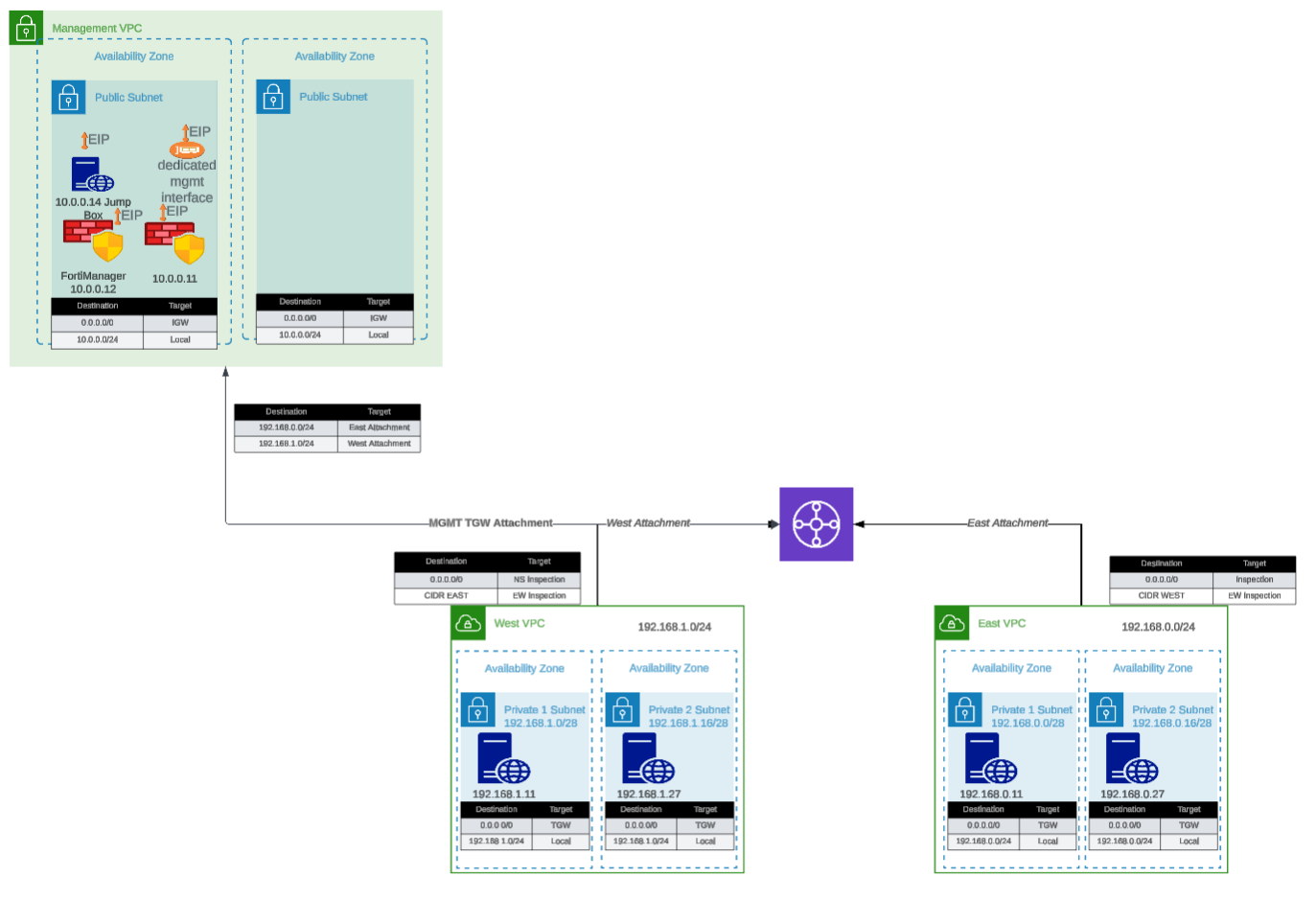
The template conditionally creates the following components based on boolean variables:
Component Overview
| Component | Purpose | Required | Typical Cost/Month |
|---|---|---|---|
| Inspection VPC | Base VPC for FortiGate deployment | Yes | Minimal (VPC free) |
| Deployment Mode Config | AutoScale or HA Pair subnet creation | Yes | Minimal (subnets free) |
| Management VPC | Centralized management infrastructure | No | ~$50 (VPC/networking) |
| FortiManager | Policy management and orchestration | No | ~$73 (m5.large) |
| FortiAnalyzer | Logging and reporting | No | ~$73 (m5.large) |
| Jump Box | Bastion host for secure access | No | ~$7 (t3.micro) |
| Transit Gateway | Central hub for VPC interconnectivity | No | ~$36 + data transfer |
| Spoke VPCs (East/West) | Simulated workload VPCs | No | ~$50 (networking) |
| Linux Instances | HTTP servers and traffic generators | No | ~$14 (2x t3.micro) |
Total estimated cost for complete lab: ~$300-400/month
Tip
Minimal Deployment: You can deploy just the Inspection VPC with deployment mode selection (~$0-5/month) and integrate with existing infrastructure.
Component Details
1. Management VPC (Optional)
Purpose: Centralized management infrastructure isolated from production traffic
Components:
- Dedicated VPC with public and private subnets across two Availability Zones
- Internet Gateway for external connectivity
- Security groups for management traffic
- Standardized resource tags for discovery by
autoscale_template
Configuration variable:
enable_build_management_vpc = trueWhat gets created:
Management VPC (10.3.0.0/16)
|---- Public Subnet AZ1 (10.3.1.0/24)
|---- Public Subnet AZ2 (10.3.2.0/24)
|---- Internet Gateway
\---- Route Tables
Resource tags applied (for autoscale_template discovery):
Name: {cp}-{env}-management-vpc
Name: {cp}-{env}-management-public-az1-subnet
Name: {cp}-{env}-management-public-az2-subnet
FortiManager (Optional within Management VPC)
Configuration:
enable_fortimanager = true
fortimanager_instance_type = "m5.large"
fortimanager_os_version = "7.4.5"
fortimanager_host_ip = "10" # Results in .3.0.10Access:
- GUI:
https://<FortiManager-Public-IP> - SSH:
ssh admin@<FortiManager-Public-IP> - Default credentials:
admin/<instance-id>
Use cases:
- Testing FortiManager integration with autoscale group
- Centralized policy management demonstrations
- Device orchestration testing
FortiAnalyzer (Optional within Management VPC)
Configuration:
enable_fortianalyzer = true
fortianalyzer_instance_type = "m5.large"
fortianalyzer_os_version = "7.4.5"
fortianalyzer_host_ip = "11" # Results in .3.0.11Access:
- GUI:
https://<FortiAnalyzer-Public-IP> - SSH:
ssh admin@<FortiAnalyzer-Public-IP> - Default credentials:
admin/<instance-id>
Use cases:
- Centralized logging for autoscale group
- Reporting and analytics demonstrations
- Log retention testing
Jump Box (Optional within Management VPC)
Configuration:
enable_jump_box = true
jump_box_instance_type = "t3.micro"Access:
ssh -i ~/.ssh/keypair.pem ec2-user@<jump-box-public-ip>Use cases:
- Secure access to spoke VPC instances
- Testing connectivity without FortiGate in path (via debug attachment)
- Management access to FortiGate private IPs
Management VPC TGW Attachment (Optional)
Configuration:
enable_mgmt_vpc_tgw_attachment = truePurpose: Connects management VPC to Transit Gateway, allowing:
- Jump box access to spoke VPC Linux instances
- FortiManager/FortiAnalyzer access to FortiGate instances via TGW
- Alternative management access paths
Routing:
- Management VPC –> TGW –> Spoke VPCs
- Can be combined with
enable_debug_tgw_attachmentfor bypass testing
2. Inspection VPC and Deployment Mode (Required)
Purpose: Base VPC infrastructure for FortiGate deployment with mode-specific subnets
The inspection VPC is always created and includes subnets based on your chosen deployment mode. This template does not create the inspection VPC itself (that’s created by autoscale_template or ha_pair), but it does create the deployment mode-specific subnets that will be used by the inspection VPC.
AutoScale Deployment Mode
Configuration:
enable_autoscale_deployment = trueWhat gets created:
- GWLB subnets in two Availability Zones (indices 4 & 5)
- Named:
{cp}-{env}-inspection-gwlb-az1-subnetand{cp}-{env}-inspection-gwlb-az2-subnet - Used by autoscale_template for Gateway Load Balancer endpoints
Subnet layout:
Inspection VPC Subnets (AutoScale Mode)
|---- Index 0: Public Subnet AZ1 (FortiGate Port1)
|---- Index 1: Public Subnet AZ2 (FortiGate Port1)
|---- Index 2: Private Subnet AZ1 (FortiGate Port2)
|---- Index 3: Private Subnet AZ2 (FortiGate Port2)
|---- Index 4: GWLB Subnet AZ1 <-- Created by existing_vpc_resources
\---- Index 5: GWLB Subnet AZ2 <-- Created by existing_vpc_resources
When to use: Choose AutoScale mode when deploying autoscale_template for elastic scaling with Gateway Load Balancer.
HA Pair Deployment Mode
Configuration:
enable_ha_pair_deployment = trueWhat gets created:
- HA sync subnets in two Availability Zones (indices 10 & 11)
- Named:
{cp}-{env}-inspection-hasync-az1-subnetand{cp}-{env}-inspection-hasync-az2-subnet - Used by ha_pair template for FGCP cluster synchronization and VPC Endpoint
Subnet layout:
Inspection VPC Subnets (HA Pair Mode)
|---- Index 0: Public Subnet AZ1 (Primary FGT Port1)
|---- Index 1: Public Subnet AZ2 (Secondary FGT Port1)
|---- Index 2: Private Subnet AZ1 (Primary FGT Port2)
|---- Index 3: Private Subnet AZ2 (Secondary FGT Port2)
|---- Index 6: TGW Subnet AZ1 (Primary FGT Port3)
|---- Index 7: TGW Subnet AZ2 (Secondary FGT Port3)
|---- Index 8: Management Subnet AZ1 (Primary FGT Port4)
|---- Index 9: Management Subnet AZ2 (Secondary FGT Port4)
|---- Index 10: HA Sync Subnet AZ1 <-- Created by existing_vpc_resources
\---- Index 11: HA Sync Subnet AZ2 <-- Created by existing_vpc_resources
HA Sync Subnet Purpose:
- Heartbeat traffic: HA cluster health monitoring (UDP 5405, 5406)
- Configuration synchronization: FortiOS config sync between Primary/Secondary
- Session synchronization: Active connection state sync (TCP 703)
- VPC Endpoint access: Private AWS API calls (EC2, TGW) without IGW
When to use: Choose HA Pair mode when deploying ha_pair template for fixed-capacity Active-Passive deployment with FGCP.
Deployment Mode Mutual Exclusivity
Warning
Important: Choose One Mode Only
You cannot enable both deployment modes simultaneously:
enable_autoscale_deployment = true–> Creates GWLB subnets (indices 4 & 5)enable_ha_pair_deployment = true–> Creates HA sync subnets (indices 10 & 11)
The UI automatically unchecks one when you select the other. Attempting to enable both will result in configuration errors.
Why separate subnet indices?
- AutoScale uses lower indices (4 & 5) for GWLB subnets
- HA Pair uses higher indices (10 & 11) for HA sync subnets
- This prevents conflicts and allows clear separation of deployment architectures
- Each mode has different network requirements and traffic patterns
3. Transit Gateway and Spoke VPCs (Optional)
Purpose: Simulates production multi-VPC environment for traffic generation and testing
Configuration variable:
enable_build_existing_subnets = trueWhat gets created:
Transit Gateway
|---- East Spoke VPC (192.168.0.0/24)
|   |---- Public Subnet AZ1
|   |---- Private Subnet AZ1
|   |---- NAT Gateway (optional)
|   \---- Linux Instance (optional)
|
|---- West Spoke VPC (192.168.1.0/24)
|   |---- Public Subnet AZ1
|   |---- Private Subnet AZ1
|   |---- NAT Gateway (optional)
|   \---- Linux Instance (optional)
|
\---- TGW Route Tables
    |---- Spoke-to-Spoke (via inspection VPC)
    \---- Inspection-to-Internet
Transit Gateway
Configuration:
# Created automatically when enable_build_existing_subnets = true
# Named: {cp}-{env}-tgwPurpose:
- Central hub for VPC interconnectivity
- Enables centralized egress architecture
- Allows east-west traffic inspection
Attachments:
- East Spoke VPC
- West Spoke VPC
- Inspection VPC (created by autoscale_template)
- Management VPC (if
enable_mgmt_vpc_tgw_attachment = true) - Debug attachment (if
enable_debug_tgw_attachment = true)
Spoke VPCs (East and West)
Configuration:
vpc_cidr_east = "192.168.0.0/24"
vpc_cidr_west = "192.168.1.0/24"
vpc_cidr_spoke = "192.168.0.0/16"  # Supernet
Components per spoke VPC:
- Public and private subnets
- NAT Gateway for internet egress
- Route tables for internet and TGW connectivity
- Security groups for instance access
Linux Instances (Traffic Generators)
Configuration:
enable_east_linux_instances = true
east_linux_instance_type = "t3.micro"

enable_west_linux_instances = true
west_linux_instance_type = "t3.micro"
What they provide:
- HTTP server on port 80 (for connectivity testing)
- Internet egress capability (for testing FortiGate inspection)
- East-West traffic generation between spoke VPCs
Testing with Linux instances:
# From jump box or another instance
curl http://<linux-instance-ip>
# Returns: "Hello from <hostname>"

# Generate internet egress traffic
ssh ec2-user@<linux-instance-ip>
curl http://www.google.com  # Traffic goes through FortiGate
Debug TGW Attachment (Optional)
Configuration:
enable_debug_tgw_attachment = truePurpose: Creates a bypass attachment from Management VPC directly to Transit Gateway, allowing traffic to flow:
Jump Box --> TGW --> Spoke VPC Linux Instances (bypassing FortiGate inspection)Debug path use cases:
- Validate spoke VPC connectivity independent of FortiGate inspection
- Compare latency/throughput with and without inspection
- Troubleshoot routing issues by eliminating FortiGate as variable
- Generate baseline traffic patterns for capacity planning
Warning
Security Consideration
The debug attachment bypasses FortiGate inspection entirely. Do not enable in production environments. This is strictly for testing and validation purposes.
Documentation Sections
This documentation is organized into the following sections:
- Configuration Scenarios - Common deployment patterns and use cases
- Step-by-Step Deployment - Complete deployment guide with examples
- Operations & Troubleshooting - Post-deployment configuration, troubleshooting, and cleanup procedures